Lurssen Mastering Control Software
Master your music with secret techniques, workflow and world-renowned know-how from Lurssen Mastering
Lurssen Mastering Console is an incredible new mastering tool for both iPhone, iPad or Mac/PC that puts a lifetime of professional mastering experience at your fingertips.
Created in collaboration with Mastering Engineers Gavin Lurssen and Reuben Cohen of multiple Grammy-winning studio Lurssen Mastering, Inc. in Los Angeles, it puts you in control of the studio with all the secret tools, settings and techniques that have made the Lurssen's sound so sought after by the biggest producers and recording artists.
It faithfully recreates Lurssen’s “the whole is greater than the sum of its parts” mastering philosophy. With it, you get a world-class mastering processing chain, created and tuned by Gavin and his team to replicate the settings used in the studio when mastering hip-hop, rock, pop and more. With Lurssen Mastering Console, you can finally master with professional sound no matter if you're in the studio or on the go.
A sound philosophy
Lurssen Mastering Console is an entirely new approach to digital audio mastering. It offers a complete emulation of the entire mastering processing chain used by world-renowned mastering engineers Gavin Lurssen, Reuben Cohen and their team. This chain includes tube equalizers, solid state equalizers, limiters, de-essers and solid-state compressors. The simulation of this chain reflects its “whole chain philosophy”.
Lurssen Mastering Console models and recreates the interactions between the individual processors in its chain down to the wiring diagrams between the devices themselves. This approach gives you effective access to over 25 years of knowledge in the form of workflow secrets, special techniques, signal chains and technical know-how.
Hear the Lurssen Mastering Console difference
Here are some examples of mixes before and after being mastered with Lurssen Mastering Console. Using the “Styles” presets as a starting point, mixes were adjusted in real time using the push, automation and eq controls to capture the magic in the music. (Settings for each mastered file can be found in the audio file description.)
Master your audio everywhere
Whether you use an iPhone, iPad, Mac or PC, we have a Lurssen Mastering Console for you. It is available in two different versions depending on your needs.
It's available as a universal app for iPhone/iPad - exactly what you need when mastering your material on the go across a wide variety of sound sources. This app is available for free download working in demo mode, and has two modes that unlock full functionality: Play/Process and HD Engine.
It's also available as software for your Mac or PC. This version can be used either as a standalone or as an Audio Units, VST 2, VST 3 or AAX plug-in in your DAW of choice for incredible audio mastering in your studio or on your laptop.
When you master, you want your audio productions to sound great when played on a wide variety of different speakers and devices, from car radios to home stereos, iPods, club sound systems, and more.
Lurssen Mastering Console helps you achieve great sonic results consistently because it allows you to test your projects on a wide variety of sound systems thanks to its iPhone/iPad version. Now you can take your projects with you anywhere so you can hear exactly how they perform on the go.
A lifetime of mastering experience at your fingertips
It's easy to achieve great results with the Lurssen Mastering Console. It comes with 40 unique mastering templates, called “Styles”, that customize your mastering processing chain for hip-hop, hard rock, heavy metal, country, Americana and others. These templates take all the hard work out of the mastering process; Gavin and his team have already adjusted everything for you from the signal flow to the individual settings of each processor. All you have to do is upload a song, choose a template and you're ready to start mastering. Or, in other words, Lurssen Mastering Console can help you achieve incredibly professional results especially when a trip to Lurssen Mastering in Los Angeles is not in the budget.
Easy controls
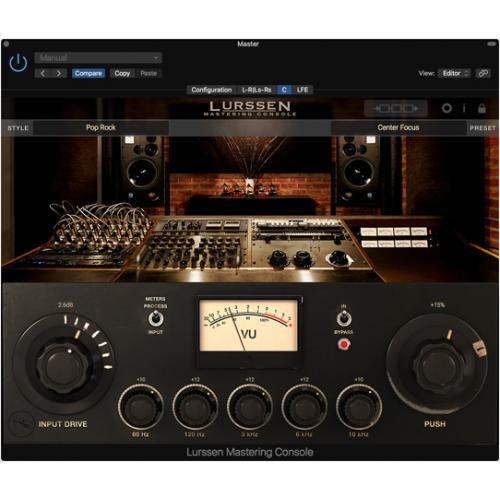
Once you've selected a template, Lurssen Mastering Console presents you with three easy-to-use controls that allow you to adjust the master to your liking. Just like in Gavin's studio, you can adjust the linked Input Drive, adjust 5 EQ bands and also use the special “PUSH” button. The “PUSH” button is particularly important because it allows you to subtly and evenly adjust the EQs so you can “pilot” the flow of the song and highlight certain parts, adding that special Lurssen magic to your masters. you also have two VU meters, a master bypass switch (very useful for listening to your work compared to the original file) and a STEREO/MONO monitoring switch. You can record your adjustments in real time to both knobs via the automation feature so you can really get into the innards of your master and record your work for later.
View the waveform
Lurssen Mastering Console allows you to visualize audio thanks to its useful waveform display. You can tag audio loops, view and edit automations, and move freely through your chosen song.
Styles and control
Lurssen Mastering Console is designed to sound great without requiring any adjustments on your part. That said, you can see and change some of Gavin's processing chain settings thanks to the Chain preview screen. Here you can view individual components of each Style template and make adjustments such as gain reduction on specific equipment. You can save your changes to the Style template as a preset, which can also save different EQ settings.
Mono, stereo and surround
The Lurssen Mastering Console plugin can be inserted into mono, stereo, multichannel tracks and buses in any compatible DAW, for maximum flexibility and usability as both a mastering and mixing tool. Mono operation not only allows you to use the plugin on single mono tracks (like vocals, bass, guitar, etc.) in common mixing sessions, on stereo buses for stem mixing or mastering tasks, but it can also be used in 5.1 surround projects or even larger projects depending on the DAW selected. Parameters, presets and Styles will remain consistent across all instances on multichannel buses when the settings are turned on (link). This will allow for greater accuracy and coherence in surround operation.
Powerful processing and effortless export
Just like mixing, mastering is about ensuring your audio sounds as good as possible on as many playback devices as possible. Lurssen Mastering Console allows for an extreme degree of sonic detail thanks to its 88.2/96kHz DSP processing. Final audio rendered with Lurssen Mastering Console sounds great in any format. It allows you to export in all popular file formats, from AAC to WAV, FLAC and more.
Projects in Lurssen Mastering Console for Mac and PC are compatible with Lurssen Mastering Console for iPhone/iPad. This means that if you have both applications, you can transfer your projects and use the iPhone/iPad version to hear how your work sounds on a variety of different playback devices (you can also use the iPhone/iPad version to finalize projects, and vice versa).
With the Lurssen Mastering Console, musicians finally have a way to achieve professional-quality audio mastering results anytime, anywhere.
Digital Delivery Mastering
“Mastered for iTunes”
If you are mastering your music for digital distribution and streaming services such as iTunes®, Pandora® and Spotify®, Lurssen Mastering Console can ensure your music is heard. Lurssen Mastering Console has a new Digital Delivery Mastering feature that provides you with mastered audio files that meet Apple's “Mastered for iTunes” specifications in sample rate, bit depth, and peak levels, ensuring your audio plays perfectly in compressed formats like AAC.
Digital distribution and streaming services have become the de facto standard for delivering music to consumers, and engineers have begun to take more care with the production of the final master to ensure that the quality of the audio, when compressed to AAC or other formats, is as close as possible to the original files. For this reason, Apple developed a set of best practices and tools that should be used to ensure compatibility that were called “Mastered for iTunes®”.
Technically, files must meet high-resolution sample rate and bit depth requirements, but the most important aspect is the peak level. As the trend in contemporary digital music production is towards super loud masters, distortion is created as a byproduct of the extreme use of digital peak limiters pushing the level up. Even if the maximum peak volume of the file is not exceeding 0.0 dBFS, digital clips will still occur when the file is decompressed back to PCM format for playback. Apple's Mastered for iTunes criteria states that no clips above 0.0 dBFS can be present on the digital master for submission. When verified by Apple tools made specifically for this purpose, masters with digital clips may be rejected.
This is where Lurssen Mastering Console's new Digital Delivery Mastering option comes in. It provides an additional layer of protection against spike clips that may be generated by the AAC compression and decompression process. This process can cause clips that may go unnoticed when mixing and mastering with common sample peak meters. This is made possible by the peak limiter at the end of the mastering chain working in a specific way. This ensures that the compressed file is free from distortion when played through digital distribution services such as Apple iTunes®, Spotify and Pandora.
The Digital Delivery Mastering option is part of the HD Engine in-app purchase, and can be enabled independently of the HD Engine in the settings menu. It is also included in the free update for Mac/PC users.
Test before you buy
Lurssen Mastering Console for iPhone and iPad is free to try. This means you can experience its tremendous ease of use and phenomenal sound today at no cost. A random noise will interrupt playback in the demo version. Lurssen Mastering Console for iPhone/iPad features two in-app purchases that unlock full functionality: Play/Process and HD Engine. Play/Process enables unrestricted playback, monitoring and processing, 48kHz maximum sampling rate from DSP processing and exports compressed formats such as AAC and OGG. HD Engine allows unrestricted playback, processing and monitoring at 88.2/96kHz sample rate for DSP and export, selectable dithering and exports uncompressed formats such as WAV and FLAC.
Lurssen Mastering Console for Mac/PC is free to try for 10 days. A random noise will interrupt playback when the test period ends.
Characteristics
- Created in collaboration with mastering engineers Gavin Lurssen, Reuben Cohen and their team at multi-Grammy winning studio Lurssen Mastering, Inc.
- Accurately reproduces Lurssen Mastering, Inc.'s unique philosophy, studio workflow and signal chain
- Separate versions available for iPhone/iPad and Mac/PC
- 40 pre-designed “Styles” created by Gavin Lurssen and his team replicate the settings and equipment used to master pop, hip-hop, rock and more
- 3 easy-to-navigate displays: “Studio” view with controls, “Wave” waveform view and “View” view for individual processors
- Input Drive button
- 5 EQ bands with fixed frequency
- “PUSH” button to subtly adjust specific song passages through uniform EQ adjustments
- Complete automation of adjustments to audio content
- Linkable Input Drive control for stereo balance adjustments
- Assignable VU meter for Input/Process
- Stereo/Mono monitoring capability
- 88.2/96kHz DSP processing
- Importing iPhone/iPad Music Library
- Resizable GUI (Mac/PC version)
- Full-featured modes available via in-app purchase: Play/Process and HD Engine (iPhone/iPad version)
- Digital Delivery Mastering (DDM) feature ensures your mastering complies with Apple “Mastered for iTunes” specifications and other digital distribution systems
- Project file compatible between Mac/PC and iPhone/iPad versions
Specifications
- Lurssen Mastering Console
- Separate versions available for iPhone/iPad and Mac/PC
- Mac/PC version works as a standalone app or as a plug-in for your DAW
- 40 pre-made "Styles" created by Gavin Lurssen and team that reproduce the settings and equipment used